Paze $10 Back: Enroll, Check Out, and Avoid Gift Card Issues
Paze still lists its spend-$10-get-$10 offer through September 10, but users should link their card first, confirm the checkout offer badge, and avoid risky gift-card paths.
TL;DR
To use the Paze spend-$10-get-$10 offer, link the card in Paze, choose Paze at checkout, and make sure the offer details appear for that exact card before paying. Seeing Paze as a payment method is not enough.
- August 28 update: Paze still lists the offer as active through September 10, 2026, with up to $100 back per eligible card in a Paze wallet.
- Enroll by opening Paze and linking the card or account you plan to use.
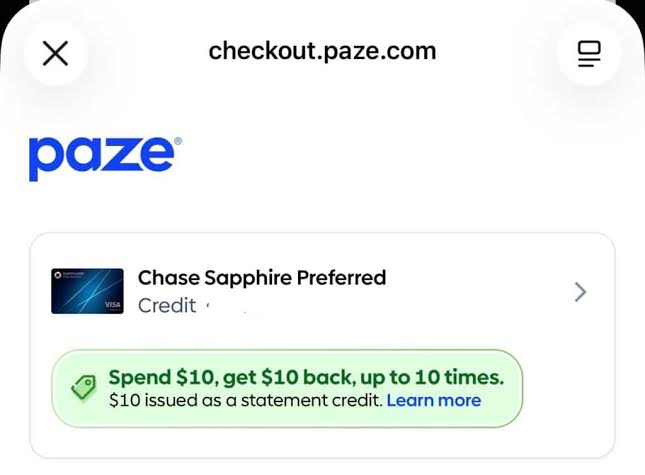
- At checkout, choose Paze and confirm the green spend-$10-get-$10 offer badge appears for that card before paying.
- Avoid assuming Newegg third-party gift cards or issuer-specific promos like Chase 10x follow the same rules as the base Paze $10 statement-credit offer.
August 28 update
Paze still lists the spend-$10-get-$10 statement-credit offer as active through September 10, 2026. The official terms continue to say each eligible credit or debit card available in a Paze wallet can earn up to ten $10 statement credits, for up to $100 per card.
The most important check is still the Paze checkout screen. Paze says the offer details must appear for the selected card during checkout; if the offer details do not appear, the transaction is not eligible. Chase's public Paze page also says Chase business cards and authorized-user cards are not currently eligible for Paze, so do not treat every Chase card in a household as automatically usable.
Keep the base Paze statement credit separate from issuer-specific offers such as Chase 10x Ultimate Rewards. Those promos can have their own account-side terms, merchants, dates, and exclusions.
What to do now
Paze still lists its spend-$10-get-$10 statement-credit offer through September 10, 2026. The short version: link the card first, check out with Paze, and only count the credit after it posts.
- Open Paze and link the card or account you plan to use.
- At checkout, choose Paze and select the exact eligible card.
- Look for the green offer badge before paying; if the offer details are missing, treat the purchase as not confirmed.
- Save the checkout screen, merchant confirmation, posted transaction, and any offer terms you saw.
How to enroll and check out with Paze
Enrollment is simple: open the Paze interface, go to the linked accounts or linked cards area, and connect the card/account you want to use. If the card is already available in your Paze wallet, confirm it is the one you plan to use before checkout.
When a merchant supports Paze, choose Paze during checkout. The important screen is the Paze checkout sheet: it should show your selected card and the offer language, such as "Spend $10, get $10 back, up to 10 times." If you do not see the offer details for that card, do not assume the transaction will qualify.
Paze says qualifying credits can take up to two billing cycles after an eligible transaction posts, so the practical workflow is: link, verify the badge, pay, then track the posted credit.
Where the risk is
The base Paze offer and issuer-specific promos are separate. A card may be eligible for the Paze-wide $10 statement credit while a Chase, Capital One, Bank of America, Citi, U.S. Bank, Wells Fargo, or other issuer offer has its own terms. If you are chasing a points multiplier such as Chase 10x, read the issuer offer in your account before buying.
Newegg is the clearest caution point. Newegg has shown Paze restrictions for subscriptions, pre-orders, backorders, trade-in orders, and third-party gift cards. Community reports also point to gift-card refunds, blocked checkouts, and account-specific behavior at other merchants.
Those reports are useful warning signals, not issuer announcements. For Perkmon tracking, the safe rule is to log each Paze use by card, merchant, transaction amount, date, and posted-credit status. Do not count the $10 as earned until the credit appears.
References
Source links for this update:
- Paze official offer terms
- Paze official announcement
- Chase Paze eligibility page
- Newegg Paze page
- Doctor of Credit: Chase Newegg/Paze report
- Doctor of Credit: Paze $10 back discussion
- Reddit: Paze rollout complaints
- Reddit: Clover gift-card refund datapoints
- Reddit: City Experiences Paze datapoint
- How to track credit card benefits
- Perkmon vs spreadsheets
Keep exploring
Frequently asked questions
Is the Paze spend-$10-get-$10 offer still active?
Paze still lists the offer as running from June 15, 2026 through September 10, 2026, with up to 10 statement credits per eligible card, subject to the official offer terms.
How do I enroll a card in Paze?
Open Paze, go to the linked accounts or linked cards area, and connect the card/account you plan to use. At checkout, confirm that the same card is selected and that the offer details appear.
Does seeing Paze at checkout automatically mean I will get the $10 credit?
No. Paze says the offer details need to appear during checkout, the transaction has to be eligible, and credits can take up to two billing cycles after a qualifying transaction posts.
Before you act
- Issuer, merchant, and wallet offer terms can change.
- Verify current Paze, merchant, and issuer-specific terms before making a purchase.
- This article is for informational purposes only and is not financial advice.
Turn this into a repeatable workflow
Perkmon is built for the operational side of credit card perks: what is still available, what has already been used, and what needs attention before value disappears.